
Real-Time Compliance at a Glance
Your certificate compliance dashboard shows live coverage rates for every certificate type. Know instantly which properties are covered and which need attention.
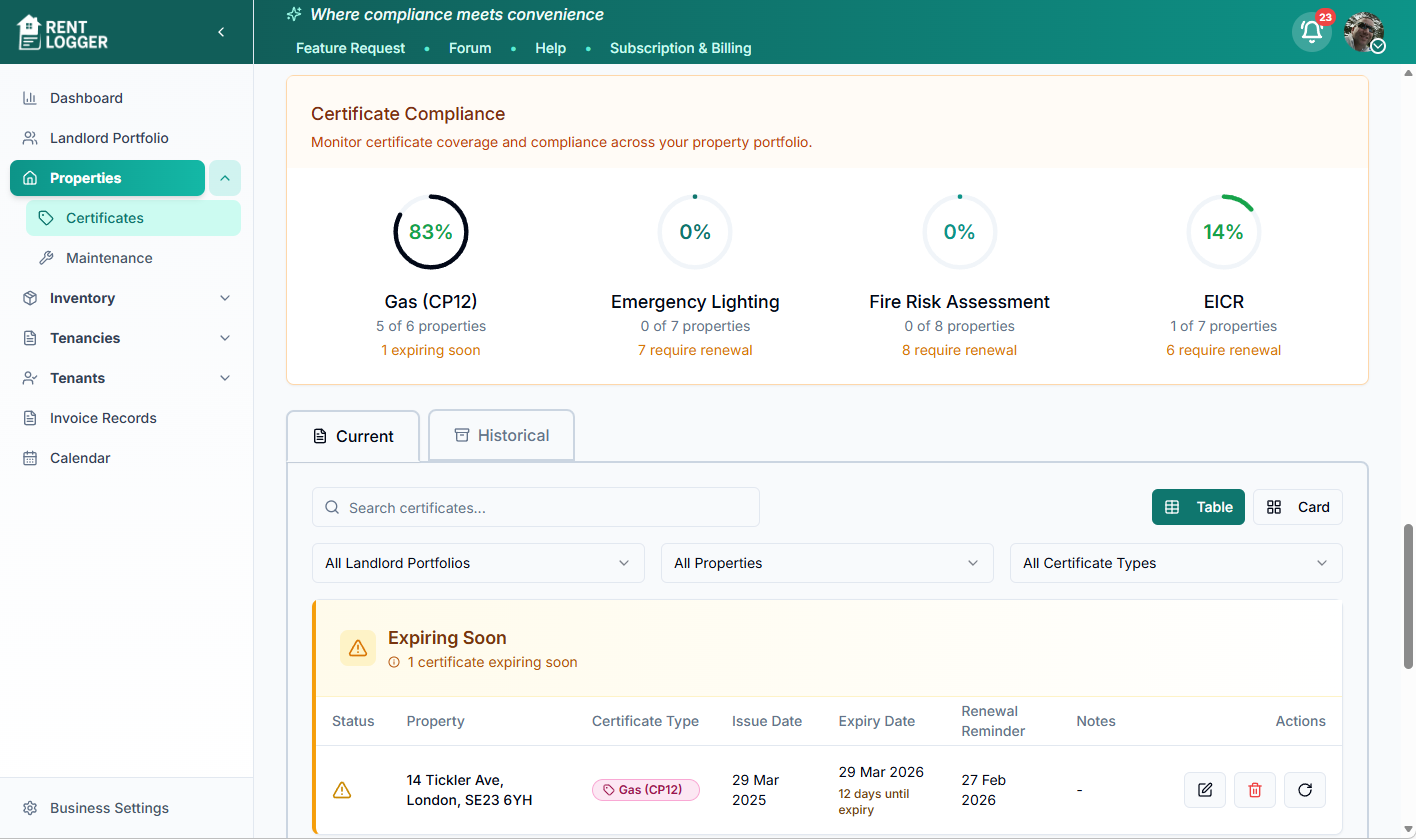
Compliance visibility across your portfolio
Visual warnings for expiring and overdue certificates
Filter by property, certificate type, or status
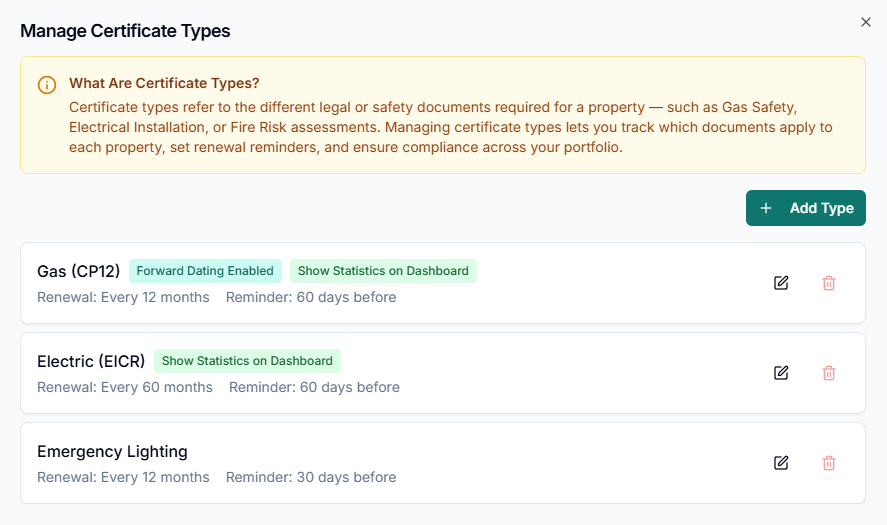
Manage Your Certificate Types
Every portfolio is different. Rent Logger lets you define exactly which certificate types your business needs to track, configure how each one behaves, and control which properties require them.
Create, Edit, or Remove Types
Build a certificate list that matches your portfolio. Not every landlord needs the same certificates — keep only what's relevant to you.
Assign Types to Properties
Not every property needs every certificate. Assign the relevant certificate types to each property and unassign any that don't apply — so compliance tracking stays accurate and clutter-free.
Set Renewal Periods & Reminders
Define how often each certificate needs renewing and how far in advance you want to be reminded. Gas safety might be 60 days; emergency lighting might be 30.
Forward Dating
When enabled, renewing early carries over unused days from the previous certificate — so you never lose coverage time by being organised.
Dashboard Compliance Statistics
Toggle this per certificate type to display live compliance percentages on your dashboard. See at a glance how covered your portfolio is.
Common Certificate Types
Here are some of the most common certificates UK landlords need to manage. You can add any of these — or create your own custom types.
Every 12 months
Legal requirementEvery 5 years
Legal requirementEvery 10 years
Legal requirementAlso managed in a dedicated EPC section with ratings and recommendations
Read more about EPC compliance →Varies by property
Legal requirementEvery 2 years
Every 12 months
Also tracked in each property's safety appliances list
Varies
Also managed in a dedicated PAT Testing section with individual appliance tracking
As required
Request Certificate Renewals in Minutes
Order bulk certificate renewals with just a few clicks. Choose the certificate type, select properties, assign a contractor, and Rent Logger handles the rest.
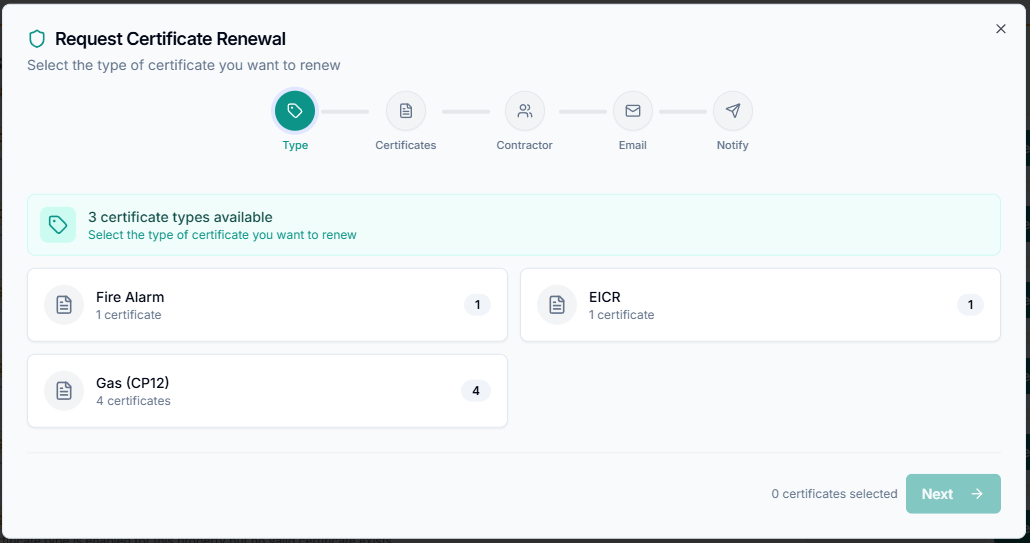
Choose Certificate Type
Select which type of certificate you need to renew. Rent Logger shows you how many certificates of each type are due, so you can plan renewals efficiently.
Select Properties
Pick individual properties or select in bulk. Filter by expiry date to focus on the most urgent renewals first.
Assign a Contractor
Choose from your saved contractors. Rent Logger generates a default email with all the property and tenant details the contractor needs to start booking appointments.
Customise & Send
Review and tweak the auto-generated message. Set the preferred send time. The contractor receives everything they need in one communication.
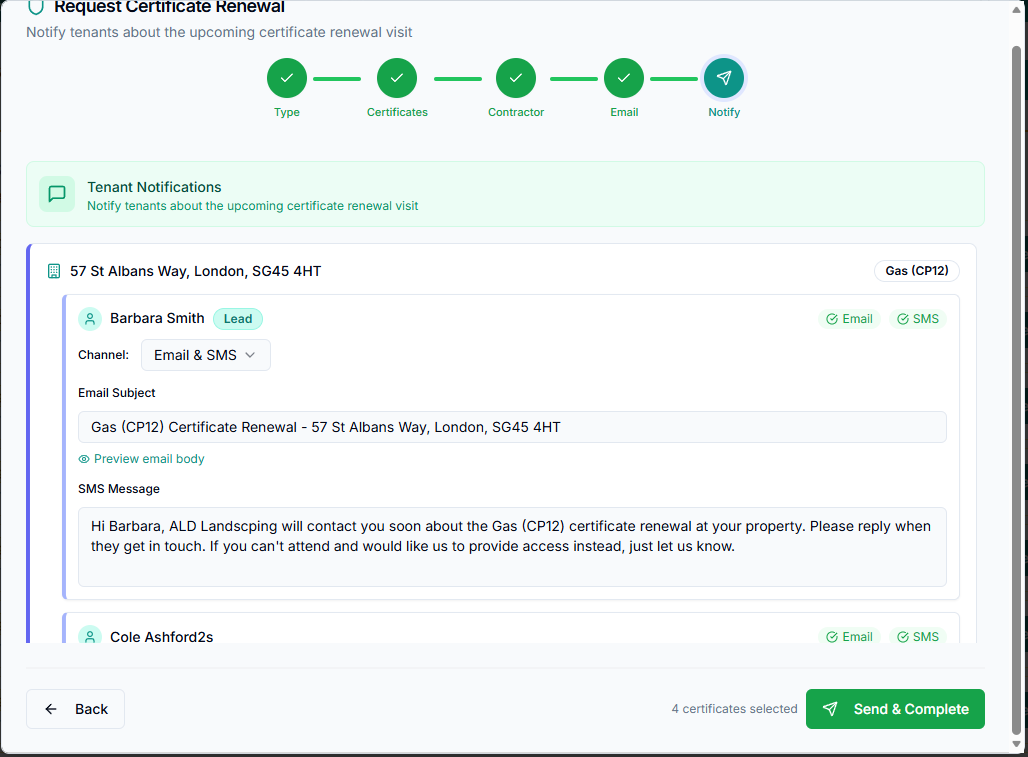
Notify Tenants
Tenants are automatically alerted via their preferred notification channel (email, SMS, or WhatsApp) with the contractor's details and what to expect.
Select certificate type and properties
Customise tenant notifications before sending
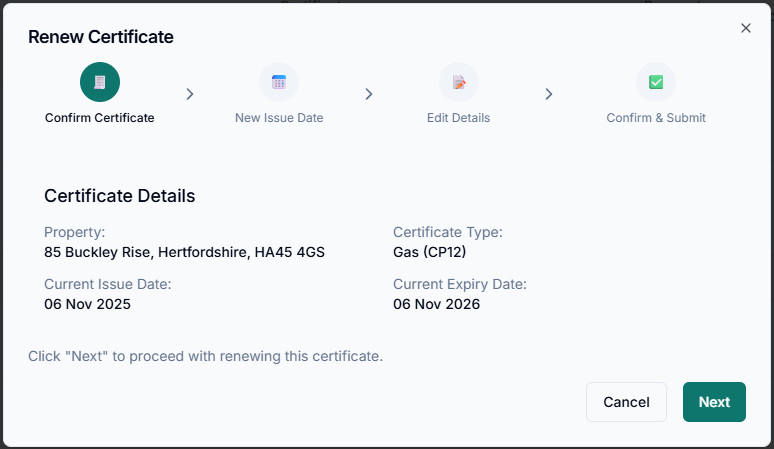
Contractors Upload Directly
Once a contractor completes a renewal, they can update the job status and upload the new certificate directly through the Rent Logger contractor portal. No more chasing PDFs over email.
Secure magic-link access — no passwords for contractors to manage
Upload renewed certificates directly against the correct property
Expiry dates and compliance stats update automatically
Full activity audit trail for every contractor action
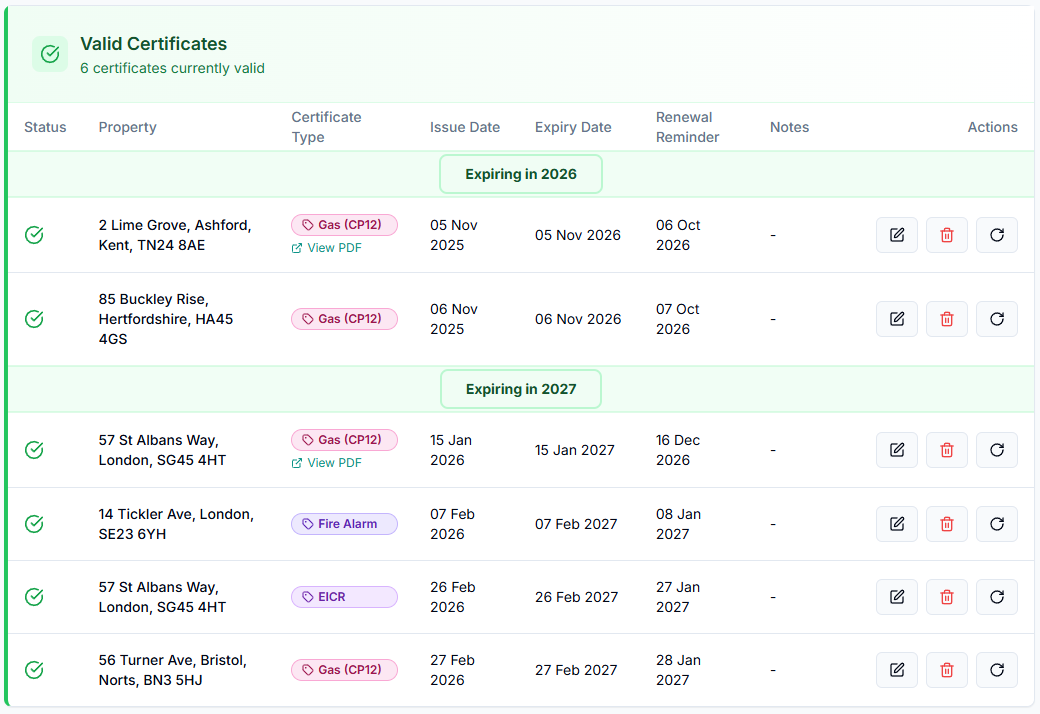
Complete Certificate Tracking
View all your valid certificates in one place. Filter by property, certificate type, or expiry date. Colour-coded status indicators make it easy to spot what needs attention.
Stay Ahead of Every Expiry
When a certificate enters its renewal reminder period, Rent Logger automatically alerts your team through multiple channels. No manual diary entries. No last-minute panic.
Email Alerts
Manager and staff accounts receive email notifications when certificates are approaching expiry. Configurable per user.
In-App Bell Icon
A notification badge appears on the bell icon in Rent Logger, with a count of how many certificates need attention.
Dashboard Metrics
The dashboard displays an "Expiring Certificates" count card. When certificates are due, the number updates in real time.
Everything You Need for Compliance
From configuring certificate types to contractor coordination, Rent Logger covers every step of the compliance lifecycle.
Fully Configurable Certificate Types
Create, edit, or remove any certificate type your business requires. Set renewal periods, reminder lead times, and choose whether to enable forward dating and dashboard statistics for each type. Assign certificate types to the properties that need them and remove them from those that don't — so every property only tracks what's relevant.
Automated Renewal Reminders
Choose how many days before expiry you want to be alerted. Reminders appear in your notification centre, via email, and as a bell icon alert — so nothing slips through the cracks.
Forward Dating
When enabled, forward dating allows a certificate renewed early to carry over unused time from the previous certificate. This means you never lose coverage days when renewing ahead of schedule.
Dashboard Compliance Statistics
Toggle dashboard statistics per certificate type to see live compliance rates across your portfolio. Instantly see what percentage of your properties are covered and which need attention.
Contractor Portal
Contractors can view their assigned tasks, update job statuses, and upload renewed certificates directly through a dedicated portal — no more chasing PDFs over email.
Direct Certificate Upload
Contractors upload the renewed certificate directly into Rent Logger via the contractor portal. It is automatically linked to the correct property and the expiry dates update straight away.
Full Audit Trail
Every certificate renewal, reminder sent, contractor communication, and tenant notification is logged. You have a complete compliance history should you ever need it for an inspection or dispute.
Never Miss an Expiry
Certificates approaching expiry are flagged with colour-coded warnings. Overdue certificates are highlighted in red, giving you a clear visual priority list.
The Complete Compliance Workflow
From the first reminder to the uploaded certificate, here is how Rent Logger keeps your portfolio compliant.
Reminder Triggered
Rent Logger detects a certificate is within its reminder window and alerts your team via email and the notification bell.
Bulk Renewal Requested
You open the Request Certificate Renewal wizard, select the expiring certificates, choose a contractor, and customise the messages.
Contractor & Tenants Notified
The contractor receives property details and tenant contact information. Tenants are notified via their preferred channel with the contractor's details.
Work Completed
The contractor carries out the inspection or assessment at the property.
Certificate Uploaded
The contractor uploads the new certificate via the contractor portal. Rent Logger automatically updates the issue date, expiry date, and compliance statistics.
Compliance Confirmed
Your dashboard shows updated compliance rates. The property is marked as covered and the next renewal reminder is automatically scheduled.